Support
Use your own domain (e.g. “sophie-and-philip.com”)
Your own domain, like www.sophie-julian.ch, makes your wedding website easier for your guests to find and gives it a personal touch. On this page, we explain how to buy a domain and use it with your Crazy in Love website.
Buy a domain or use one you already have
How do I buy a domain, and how much does it cost?
You can buy a domain for around CHF 11 a year, for example from Metanet. It’s quick and easy:
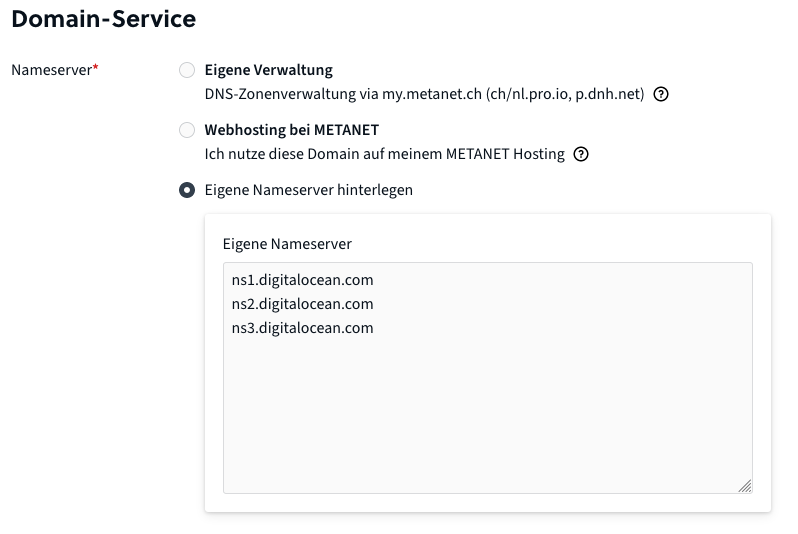
When you order, choose the option “Eigene Nameserver hinterlegen” (use your own name servers) under “Domain-Service” and enter the following name servers:
ns1.digitalocean.com
ns2.digitalocean.com
ns3.digitalocean.com
Alternatively: use a domain you already have, or buy one from another provider
No problem – you’re free to buy your domain wherever you like!
Just make sure that the only name servers in your domain’s settings are ns1.digitalocean.com, ns2.digitalocean.com and ns3.digitalocean.com. The “DNSSEC” option in the domain settings must also be turned off.
Then you can link your domain as described below.
An alternative for special requirements: link an existing domain via DNS records
To do this, follow the steps in the section Link an existing domain via DNS records.
Link your domain to Crazy in Love
As soon as you’ve bought your domain and the name servers are set correctly, go to Settings – Link a Domain in the Crazy in Love admin area, enter your new domain (without https:// or www. in front) and save. Confirm by clicking “Request Setup”:
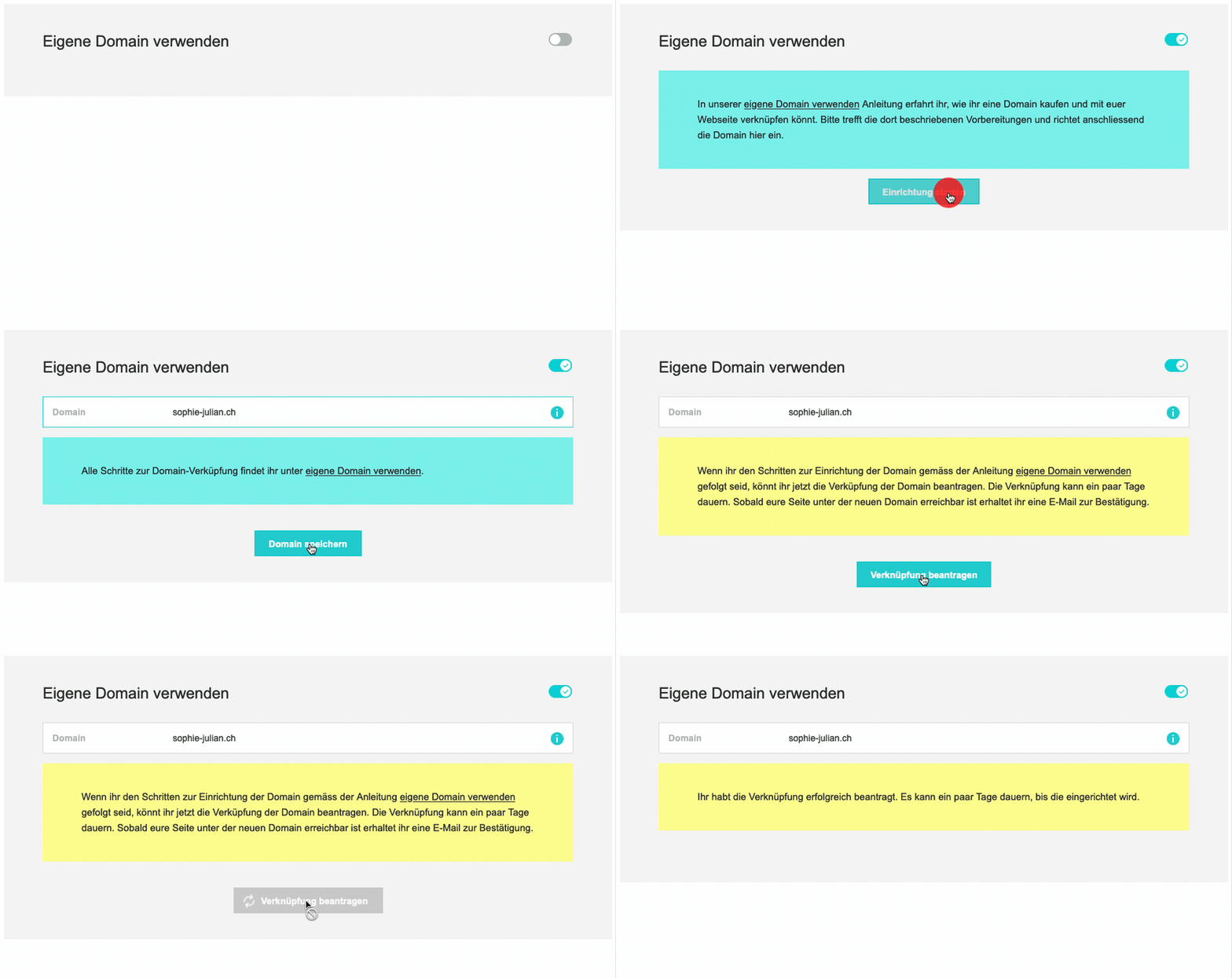
💡 After your request, it can take a few days for the domain to be linked. Our team will send you a confirmation email as soon as your website can be reached at the domain.
Until then, you can use your free crazyinlove.ch/our-name address, which you’ll find in your first registration confirmation email, for example.
More tips for advanced users
Link an existing domain via DNS records
If you also want to receive emails at your domain, for example, you can set or replace the following DNS records instead of linking the domain via name servers:
- A record for our-domain.ch → target: 64.226.122.141
- AAAA record (if there is one) for our-domain.ch → delete the DNS record
- A record for www.our-domain.ch → target: 64.226.122.141
- AAAA record (if there is one) for www.our-domain.ch → delete the DNS record
Having trouble setting up your domain?
Then just get in touch with our support team.
Any more questions?
Write to us, we’re happy to help.